<HTML>
<HEAD>
  <META NAME="GENERATOR" CONTENT="Adobe PageMill 3.0 Win">
  <TITLE>St. Andrews, Scotland - How to use the Multimedia Guide and Virtual Reality Tour</TITLE>
</HEAD>
<BODY BGCOLOR="#dfe2ff">

<TABLE BORDER="0" CELLSPACING="0" CELLPADDING="0">
<TR>
<TD ROWSPAN="4" ALIGN="CENTER" VALIGN="TOP" WIDTH="120" HEIGHT="34" BGCOLOR="#000090">
<FONT COLOR="#ffffff" FACE="Verdana"><i><b><font size="4">St Andrews</font></b></i><br>
<IMG SRC="/sta/arms.jpg" BORDER=0 HEIGHT=152 WIDTH=88
ALT="Links to all things to do with St Andrews, Scotland">
<P></FONT>

<STYLE TYPE="TEXT/CSS">
<!--
ul#navigation {
   width: 9em;
   padding: 0;
   padding-top: 0px;
   padding-bottom: 0px;
   border-top: solid 1px #44b;
   margin: 0;
}
ul#navigation li {
  list-style: none;
  background-color: #009;
  padding-top: 0px;
  padding-bottom: 0px;
  border-top: solid 1px #44b;
  text-align: center;
  FONT-FAMILY: verdana;
  FONT-SIZE: 12px;
  FONT-WEIGHT: bold;

  margin: 0;
}
ul#navigation li a {
  display: block;
  text-decoration: none;
  padding-top: 0px;
  padding-bottom: 0px;
  border-bottom: 1px solid #44b;
  border-right: 1px solid #448;
}
a:link, a:visited { color: #FFFFFF; }
a:hover, a:active { color: orange; } 
a:hover { background-color: #008; }
ul#navigation li#youarehere a { background-color: #008; }
p a:link, p a:visited { color: #000; }
-->
</style>

<ul id="navigation">
      <li><A HREF="/Tour/intro.htm"  ALT="Take the Virtual Reality Tour of St. Andrews">Virtual Reality Tour</A></li>
      <li><A HREF="/Tour/tourmap.htm#here" ALT="An Interactive, 3-Dimensional, Map of St. Andrews">3-D Map</A></li>
      <li><A HREF="/cd/index.htm" ALT="Multimedia CD-ROM of St Andrews - Screen Savers, Panoramas, Video, Virtual Castle and more !"><IMG SRC="/Icons/cddrive.gif" BORDER="0" WIDTH="32" HEIGHT="23" ALIGN="LEFT">St Andrews CD-ROM</A></li>
      <li><A HREF="/town.htm" ALT="About St. Andrews, its culture and people, Today! (including how to GET HERE !!!)">Town</A></li>
      <li><A HREF="/uni.htm" ALT="Scotland's Oldest and Finest University">University</A></li>
      <li><A HREF="/golf.htm" ALT="The Home of Golf ... The Essential Resource.">Golf</A></li>
      <li><A HREF="/History/dates.htm" ALT="An Interactive Time Line of St. Andrews' History">History</A></li>
      <li><A HREF="/History/people.htm" ALT="Interactive, Biographical Sketches of People in St. Andrews' History">People</A></li>
      <li><A HREF="/attract.htm" ALT="What to see and do in St. Andrews(There's lots for the Whole Family)">Attractions</A></li>
      <li><A HREF="/fife.htm" ALT="What to see and do in Fife near St. Andrews">Fife</A></li>
      <li><A HREF="/latest.htm" ALT="The latest news from St. Andrews - News, Weather, Events">News</A></li>
      <li><A HREF="/Business/accm.htm" ALT="Accommodation - Hotels, B&amp;B's, Self-Catering, Camping and Caravaning">Accommodation</A></li>
      <li><A HREF="/Business/dining.htm" ALT="Dining - From Fish and Chips to Haute Cuisine">Dining</A></li>
      <li><A HREF="/books.htm" ALT="Online ordering of Books, Video, Golf games, etc.">Online Shop</A></li>
      <li><A HREF="/Business/shop.htm" ALT="Shopping and Services in and around St. Andrews">Businesses</A></li>
      <li><A HREF="/Business/discount.htm" ALT="Discounts and Bargains, some of them *EXCLUSIVE* to this site, in and around St. Andrews">Discounts</A></li>
      <li><A HREF="/screen.htm" ALT="St Andrews Screen Saver - 50 pictures of St Andrews by St Andrews photographers (for Windows 95/98/NT)">Screen Saver</A></li>
      <li><A HREF="http://www.saint-andrews.co.uk/cgi/yabb/YaBB.pl" TARGET="NEW" ALT="Where you can discuss anything and everything about St. Andrews">Bulletin Board</A></li>
      <li><A HREF="/cards/ecard.htm" ALT="Send electronic greeting cards from St. Andrews">Greeting Cards</A></li>
      <li><A HREF="/qz/quiz.htm" ALT="Test your knowledge about St. Andrews - you could win a prize !">Quiz</A></li>
      <li><A HREF="/misc.htm" ALT="Other miscellaneous items about St. Andrews">Misc.</A></li>
      <li><A HREF="/new.htm" ALT="New items recently added to the guide">What's New</A></li>
      <li><A HREF="/search.htm" ALT="Search for whatever *YOU* want to know about St. Andrews">Search</A><P></li>
      <li><A HREF="/help.htm" ALT="Help - using this site (or registering your site with www.Saint-Andrews.co.uk)">Help</A></li>
</ul>
<P>&nbsp;</P>
<P>&nbsp;</P>
</TD>
<TD HEIGHT="2" BGCOLOR="#000090"></TD>
</TR><TR>
<TD BGCOLOR="#f7f7e7"><CENTER>

<CENTER><A HREF="/cgi/ard.pl?/qz/quiz.htm"><IMG SRC="/sta/ads/quizus.gif" WIDTH=468 HEIGHT=60 ALT="Test your knowledge of St. Andrews"></A></CENTER>
</CENTER> </TD>
</TR><TR HEIGHT="2">
<TD HEIGHT="2" BGCOLOR="#000090"></TD>
</TR><TR>
<TD VALIGN="TOP" WIDTH="84%">


<H3><CENTER><FONT COLOR="#000099" FACE="Arial">St. Andrews - Multimedia
Guide - Navigating the Guide</FONT></CENTER></H3>

<P><FONT COLOR="#000000" FACE="Arial">The guide provides a description
of the user interface for the St. Andrews Multimedia Guide.</FONT></P>

<P><CENTER><TABLE WIDTH="633" BORDER="1" CELLSPACING="2" CELLPADDING="0" BGCOLOR="#f7f7e7">
  <TR>
    <TD COLSPAN="3">
      <P><CENTER><B><FONT COLOR="#990000" FACE="Arial">St. Andrews
      - Navigating the Guide in Virtual Reality</FONT></B></CENTER></TD>
  </TR>
  <TR>
    <TD WIDTH="111" ROWSPAN="3" VALIGN="TOP">
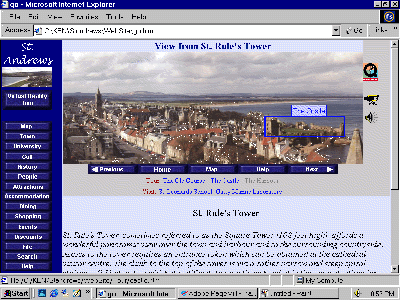
      <P ALIGN="RIGHT"><FONT SIZE="-1">Down the left side of the screen
      is a menu bar which should always be visible.<BR>
      If it is not, pressing the &quot;home&quot; button on any page
      should activate it.</FONT></P>

      <P ALIGN="RIGHT"><FONT SIZE="-1">The title &quot;St.Andrews&quot;
      is followed by a small window with a continuously scrolling view
      of St. Andrews. (<A HREF="faq.htm#java">If this is not working
      it means you have a Java problem</A>)</FONT></P>

      <P ALIGN="RIGHT"><FONT SIZE="-1">As you move your mouse over the
      buttons they should brighten (<A HREF="faq.htm#javascript">If
      they don't, you have a Java Script Problem</A>) If you pause
      with the mouse steady over a button, a description of the button's
      function will appear.</FONT>
    </TD>
    <TD WIDTH="412" HEIGHT="26" VALIGN="TOP">
      <P><CENTER><FONT SIZE="-1">The layout is best viewed on a monitor
      with 800x600 resolution. With the browser maximized to fill the
      screen.</FONT></CENTER></TD>
    <TD WIDTH="99" ROWSPAN="3" VALIGN="TOP"><FONT SIZE="-1">To the
      right of the main view, in the light grey sidebar, may appear
      icons representing special features relevant to this page ...
      e.g. QuickTime Virtual Reality Movie, Video or Sound Clips. If
      these icons are missing it implies the feature is not present
      on the page. Clicking on the icon will activate that feature.</FONT></TD> 
  </TR>
  <TR>
     
    <TD WIDTH="99" HEIGHT="300" BGCOLOR="#808080" VALIGN="TOP" ALIGN="CENTER"><IMG SRC="Images/screen.gif" WIDTH="400" HEIGHT="300" NATURALSIZEFLAG="3" ALIGN="BOTTOM"></TD>
  </TR>
  <TR>
    <TD WIDTH="99" HEIGHT="279" VALIGN="TOP">
      <P><CENTER><FONT SIZE="-1">The main picture is the virtual reality
      scene.<BR>
      As soon as you click anywhere on the picture it will stop scrolling
      and allow you to drag the picture around with the mouse. As the
      mouse passes over &quot;hot-spots&quot; the spot is outlined
      in blue and a description appears next to the cursor (see castle
      outlined above).<BR>
      If you click on the hot-spot the appropriate next scene or page
      will opened, allowing one to move from scene to scene. Pressing
      the space bar, after at least one click on the picture, will
      highlight all hot spots in a scene. Pressing the space bar again
      will clear the highlighting.<BR>
      Immediately below the screen is a grey area with menu buttons.
      These are described below. Also in the gray area are links to
      other VR Tour sites or other pages of information one can visit
      which are relevant to that scene.</FONT></CENTER></P>

      <P><CENTER><FONT SIZE="-1">Below the virtual reality segment
      is descriptive text, photos and other links. The initial text
      may be in italics, indicating it is of significance to thos who
      may visit this scene in reality, i.e. personally. The remaining
      text describes the place which is the subject of the scene.</FONT></CENTER>
    </TD>
  </TR>
  <TR>
    <TD COLSPAN="3">
      <P><CENTER><B><FONT COLOR="#990000" FACE="Arial">A Description
      of the Buttons</FONT></B></CENTER></P>

      <P><B><FONT COLOR="#990000" FACE="Arial">On the left sidebar</FONT></B></P>

      <P><FONT COLOR="#990000" FACE="Arial"><IMG SRC="Icons/btnvrt.jpg" WIDTH="100" HEIGHT="40" ALIGN="BOTTOM" BORDER="0" NATURALSIZEFLAG="3"></FONT><FONT COLOR="#000000" FACE="Arial">This button begins the virtual
      tour. The tour starts at the top of St. Rules Tower.</FONT></P>

      <P><FONT COLOR="#000000" SIZE="-1" FACE="Arial"><IMG SRC="Icons/btnmap.jpg" WIDTH="100" HEIGHT="20" ALIGN="BOTTOM" BORDER="0" NATURALSIZEFLAG="3"></FONT><FONT COLOR="#000000" FACE="Arial">This button will take you to a
      3-dimensional map of St. Andrews town centre. The map is clickable
      to jump to any virtual tour scene and several web pages of interest.</FONT></P>

      <P><B><FONT COLOR="#990000" FACE="Arial">On the right sidebar
      (or elsewhere in the guide)</FONT></B></P>

      <P><FONT COLOR="#000000" SIZE="-1" FACE="Arial"><IMG SRC="Icons/qtvrlogo.gif" WIDTH="39" HEIGHT="42" ALIGN="BOTTOM" BORDER="0" NATURALSIZEFLAG="0"></FONT><FONT COLOR="#000000" FACE="Arial">This icon indicates that a Quicktime
      Virtual Reality movie of the scene is available. This requires
      a plug-in/ movie player from Apple Computer </FONT><FONT FACE="Arial"><A HREF="http://www.apple.com/quicktime/">which is available here</A></FONT><FONT COLOR="#000000" FACE="Arial">.</FONT></P>

      <P><FONT COLOR="#000000" FACE="Arial"><IMG SRC="Icons/video.gif" WIDTH="36" HEIGHT="29" ALIGN="BOTTOM" BORDER="0" NATURALSIZEFLAG="3">This
      icon indicates that a video clip is available for viewing. The
      video clip is on a related theme. These clips are usually .AVI
      files and can be large, requiring significant download time.</FONT></P>

      <P><FONT COLOR="#000000" FACE="Arial"><IMG SRC="Icons/Rny.JPG" WIDTH="22" HEIGHT="30" ALIGN="BOTTOM" BORDER="0" NATURALSIZEFLAG="3">This
      </FONT><FONT FACE="Arial"><A HREF="http://www.exitreality.com/rubberneck">RubberNeck</A></FONT><FONT COLOR="#000000" FACE="Arial"> icon indicates a virtual reality
      scene on a related theme is available for visiting.</FONT></P>

      <P><FONT COLOR="#000000" FACE="Arial"><IMG SRC="Icons/speaker.gif" WIDTH="32" HEIGHT="32" ALIGN="BOTTOM" BORDER="0" NATURALSIZEFLAG="3">This
      icon indicates that an audio clip is available for viewing. The
      audio clip is on a related theme.</FONT></P>

      <P><FONT COLOR="#000000" FACE="Arial"><IMG SRC="Icons/book.gif" WIDTH="37" HEIGHT="30" ALIGN="BOTTOM" BORDER="0" NATURALSIZEFLAG="3">This
      icon, appearing throughout the guide, indicates that there is
      recommended further reading available at our </FONT><FONT FACE="Arial"><A HREF="books.htm">on-line bookstore</A></FONT><FONT COLOR="#000000" FACE="Arial">.</FONT></P>

      <P><A HREF="Business/discount.htm"><FONT FACE="Arial"><IMG SRC="Icons/pc.gif" WIDTH="40" HEIGHT="40" ALIGN="BOTTOM" BORDER="0" NATURALSIZEFLAG="3"></FONT></A><FONT COLOR="#000000" FACE="Arial">This gold star indicates a business
      establishment which offers a discount to customers who book or
      buy via this St. Andrews page or their web page. </FONT><FONT FACE="Arial"><A HREF="Business/discount.htm">Click on the star
      to go to the discounts description page</A></FONT><FONT COLOR="#000000" FACE="Arial">.</FONT></P>

      <P><B><FONT COLOR="#990000" FACE="Arial">Under the virtual reality
      scene</FONT></B></P>

      <P><FONT COLOR="#000000" SIZE="-1" FACE="Arial"><IMG SRC="Icons/btnprv.jpg" WIDTH="100" HEIGHT="20" ALIGN="BOTTOM" BORDER="0" NATURALSIZEFLAG="3"></FONT><FONT COLOR="#000000" FACE="Arial">This button will take you to the
      previous virtual reality scene on the tour. Using next and previous
      buttons enables the visitor to follow a guided tour of St. Andrews.
      It is possible to get off the tour and rejoin at any time.</FONT></P>

      <P><FONT COLOR="#000000" SIZE="-1" FACE="Arial"><IMG SRC="Icons/btnhom.jpg" WIDTH="100" HEIGHT="20" ALIGN="BOTTOM" BORDER="0" NATURALSIZEFLAG="3"></FONT><FONT COLOR="#000000" FACE="Arial">This button will return you to
      the opening page of the www.saint-andrews.co.uk site.</FONT></P>

      <P><FONT COLOR="#000000" SIZE="-1" FACE="Arial"><IMG SRC="Icons/btnmap.jpg" WIDTH="100" HEIGHT="20" ALIGN="BOTTOM" BORDER="0" NATURALSIZEFLAG="3"></FONT><FONT COLOR="#000000" FACE="Arial">This button will display a map
      of the town, with a flashing arrow pointing to where you are
      in town. If at first you see an arrow on a blanl back ground
      then please be patient the background map may take a while to
      load, but afterwards, further references to maps of the tour
      should be much faster as the same background map is used each
      time.</FONT></P>

      <P><FONT COLOR="#000000" SIZE="-1" FACE="Arial"><IMG SRC="Icons/btnhlp.jpg" WIDTH="100" HEIGHT="20" ALIGN="BOTTOM" BORDER="0" NATURALSIZEFLAG="3"></FONT><FONT COLOR="#000000" FACE="Arial">This button, will take you to the
      help page.</FONT></P>

      <P><FONT COLOR="#000000" SIZE="-1" FACE="Arial"><IMG SRC="Icons/btnnxt.jpg" WIDTH="100" HEIGHT="20" ALIGN="BOTTOM" BORDER="0" NATURALSIZEFLAG="3"></FONT><FONT COLOR="#000000" FACE="Arial">This button will take you to the
      next part of the virtual tour of St.Andrews. Following this route,
      every virtual scene will be visited, and the visitor will gain
      a thorough impression of St. Andrews.</FONT></P>

      <P><B><FONT COLOR="#990000" FACE="Arial">Scrolling Text</FONT></B><FONT SIZE="-1" FACE="Arial">, </FONT><FONT FACE="Arial">as seen below,
      stops scrolling when the mouse is over it. The mouse can be used
      to drag the text up or down to see other areas or to click on
      links.</FONT></P>

      <P><CENTER>
      <APPLET WIDTH="300" HEIGHT="100" ALIGN="BOTTOM" CODE="yavs.class" CODEBASE="./">
           <PARAM NAME="MSGTEXT" VALUE="./motd.htm">
           <PARAM NAME="BGCOLOR" VALUE="#dfe2ff">
           <PARAM NAME="SPEED" VALUE="120">Sorry, Your browser doesn't support JAVA 
      </APPLET></CENTER>
    </TD>
  </TR>
</TABLE></CENTER></P>

<CENTER>

<CENTER><A HREF="/cgi/ard.pl?/qz/quiz.htm"><IMG SRC="/sta/ads/quizus.gif" WIDTH=468 HEIGHT=60 ALT="Test your knowledge of St. Andrews"></A></CENTER>
</CENTER> 
<P><CENTER><A HREF="http://www.saint-andrews.co.uk/" TARGET="_top"><FONT SIZE="-2" FACE="Arial"><IMG SRC="/sta/btnhom.jpg" WIDTH="100"HEIGHT="20" ALIGN="BOTTOM" BORDER="0" NATURALSIZEFLAG="3"></FONT></A></CENTER></P>
<P><CENTER><A HREF="/copyright.htm"><FONT SIZE="-2" FACE="Arial">Copyright</FONT></A><FONT SIZE="-2" FACE="Arial"> 
© 1999-2013 <A HREF="http://www.standrewsmedia.com/">St Andrews Media</A> All Rights Reserved.</FONT></CENTER></P>
</TD></TR></TABLE>

<script type="text/javascript">
var gaJsHost = (("https:" == document.location.protocol) ? "https://ssl." : "http://www.");
document.write(unescape("%3Cscript src='" + gaJsHost + "google-analytics.com/ga.js' type='text/javascript'%3E%3C/script%3E"));
</script>
<script type="text/javascript">
try {
var pageTracker = _gat._getTracker("UA-9886177-2");
pageTracker._trackPageview();
} catch(err) {}</script>

</BODY>
</HTML>