<HTML>
<HEAD>
  <META NAME="GENERATOR" CONTENT="Adobe PageMill 3.0 Win">
  <TITLE>St. Andrews, Scotland - FAQ</TITLE>
</HEAD>
<BODY BGCOLOR="#dfe2ff">

<TABLE BORDER="0" CELLSPACING="0" CELLPADDING="0">
<TR>
<TD ROWSPAN="4" ALIGN="CENTER" VALIGN="TOP" WIDTH="120" HEIGHT="34" BGCOLOR="#000090">
<FONT COLOR="#ffffff" FACE="Verdana"><i><b><font size="4">St Andrews</font></b></i><br>
<IMG SRC="/sta/arms.jpg" BORDER=0 HEIGHT=152 WIDTH=88
ALT="Links to all things to do with St Andrews, Scotland">
<P></FONT>

<STYLE TYPE="TEXT/CSS">
<!--
ul#navigation {
   width: 9em;
   padding: 0;
   padding-top: 0px;
   padding-bottom: 0px;
   border-top: solid 1px #44b;
   margin: 0;
}
ul#navigation li {
  list-style: none;
  background-color: #009;
  padding-top: 0px;
  padding-bottom: 0px;
  border-top: solid 1px #44b;
  text-align: center;
  FONT-FAMILY: verdana;
  FONT-SIZE: 12px;
  FONT-WEIGHT: bold;

  margin: 0;
}
ul#navigation li a {
  display: block;
  text-decoration: none;
  padding-top: 0px;
  padding-bottom: 0px;
  border-bottom: 1px solid #44b;
  border-right: 1px solid #448;
}
a:link, a:visited { color: #FFFFFF; }
a:hover, a:active { color: orange; } 
a:hover { background-color: #008; }
ul#navigation li#youarehere a { background-color: #008; }
p a:link, p a:visited { color: #000; }
-->
</style>

<ul id="navigation">
      <li><A HREF="/Tour/intro.htm"  ALT="Take the Virtual Reality Tour of St. Andrews">Virtual Reality Tour</A></li>
      <li><A HREF="/Tour/tourmap.htm#here" ALT="An Interactive, 3-Dimensional, Map of St. Andrews">3-D Map</A></li>
      <li><A HREF="/cd/index.htm" ALT="Multimedia CD-ROM of St Andrews - Screen Savers, Panoramas, Video, Virtual Castle and more !"><IMG SRC="/Icons/cddrive.gif" BORDER="0" WIDTH="32" HEIGHT="23" ALIGN="LEFT">St Andrews CD-ROM</A></li>
      <li><A HREF="/town.htm" ALT="About St. Andrews, its culture and people, Today! (including how to GET HERE !!!)">Town</A></li>
      <li><A HREF="/uni.htm" ALT="Scotland's Oldest and Finest University">University</A></li>
      <li><A HREF="/golf.htm" ALT="The Home of Golf ... The Essential Resource.">Golf</A></li>
      <li><A HREF="/History/dates.htm" ALT="An Interactive Time Line of St. Andrews' History">History</A></li>
      <li><A HREF="/History/people.htm" ALT="Interactive, Biographical Sketches of People in St. Andrews' History">People</A></li>
      <li><A HREF="/attract.htm" ALT="What to see and do in St. Andrews(There's lots for the Whole Family)">Attractions</A></li>
      <li><A HREF="/fife.htm" ALT="What to see and do in Fife near St. Andrews">Fife</A></li>
      <li><A HREF="/latest.htm" ALT="The latest news from St. Andrews - News, Weather, Events">News</A></li>
      <li><A HREF="/Business/accm.htm" ALT="Accommodation - Hotels, B&amp;B's, Self-Catering, Camping and Caravaning">Accommodation</A></li>
      <li><A HREF="/Business/dining.htm" ALT="Dining - From Fish and Chips to Haute Cuisine">Dining</A></li>
      <li><A HREF="/books.htm" ALT="Online ordering of Books, Video, Golf games, etc.">Online Shop</A></li>
      <li><A HREF="/Business/shop.htm" ALT="Shopping and Services in and around St. Andrews">Businesses</A></li>
      <li><A HREF="/Business/discount.htm" ALT="Discounts and Bargains, some of them *EXCLUSIVE* to this site, in and around St. Andrews">Discounts</A></li>
      <li><A HREF="/screen.htm" ALT="St Andrews Screen Saver - 50 pictures of St Andrews by St Andrews photographers (for Windows 95/98/NT)">Screen Saver</A></li>
      <li><A HREF="http://www.saint-andrews.co.uk/cgi/yabb/YaBB.pl" TARGET="NEW" ALT="Where you can discuss anything and everything about St. Andrews">Bulletin Board</A></li>
      <li><A HREF="/cards/ecard.htm" ALT="Send electronic greeting cards from St. Andrews">Greeting Cards</A></li>
      <li><A HREF="/qz/quiz.htm" ALT="Test your knowledge about St. Andrews - you could win a prize !">Quiz</A></li>
      <li><A HREF="/misc.htm" ALT="Other miscellaneous items about St. Andrews">Misc.</A></li>
      <li><A HREF="/new.htm" ALT="New items recently added to the guide">What's New</A></li>
      <li><A HREF="/search.htm" ALT="Search for whatever *YOU* want to know about St. Andrews">Search</A><P></li>
      <li><A HREF="/help.htm" ALT="Help - using this site (or registering your site with www.Saint-Andrews.co.uk)">Help</A></li>
</ul>
<P>&nbsp;</P>
<P>&nbsp;</P>
</TD>
<TD HEIGHT="2" BGCOLOR="#000090"></TD>
</TR><TR>
<TD BGCOLOR="#f7f7e7"><CENTER>

<CENTER><A HREF="/cgi/ard.pl?/qz/quiz.htm"><IMG SRC="/sta/ads/quizus.gif" WIDTH=468 HEIGHT=60 ALT="Test your knowledge of St. Andrews"></A></CENTER>
</CENTER> </TD>
</TR><TR HEIGHT="2">
<TD HEIGHT="2" BGCOLOR="#000090"></TD>
</TR><TR>
<TD VALIGN="TOP" WIDTH="84%">


<H3><CENTER><FONT COLOR="#000099" FACE="Arial">St. Andrews - Multimedia
Guide - Frequently Asked Questions (FAQ)</FONT></CENTER></H3>

<P><CENTER><TABLE WIDTH="566" BORDER="1" CELLSPACING="2" CELLPADDING="0"
BGCOLOR="#f7f7e7">
  <TR>
    <TD COLSPAN="2">
      <P><CENTER><B><FONT COLOR="#990000" FACE="Arial">Frequently Asked
      Questions</FONT></B></CENTER></TD>
  </TR>
  <TR>
    <TD WIDTH="180"><B><FONT COLOR="#990000" FACE="Arial">QUESTION:</FONT></B></TD> 
    <TD WIDTH="377"><B><FONT COLOR="#990000" FACE="Arial">ANSWER:</FONT></B></TD> 
  </TR>
  <TR>
    <TD WIDTH="180" VALIGN="TOP"><A NAME="java"></A><FONT FACE="Arial">My
      browser doesn't support Java, why did you choose to use it so
      extensively ?</FONT></TD> 
    <TD WIDTH="377">
      <P><FONT FACE="Arial">We chose Java to implement the VR scenes
      because it does not require a plug-in down load (like QuickTime),
      and because the VR scenes are roughly a third to a half the size
      of comparable resolution QTVR scenes. Some of the VR scenes in
      this site are also available in QTVR by clicking on the <IMG 
      SRC="Icons/qtvrlogo.gif" WIDTH="24" HEIGHT="29" ALIGN="BOTTOM"
      BORDER="0" NATURALSIZEFLAG="0">icon on the right side-bar of
      a VR Tour page.</FONT></P>

      <P><FONT FACE="Arial">We strongly suggest that you update to
      a version that does support Java and Java script. This is becoming
      an industry standard and not having Java is going to limit your
      enjoyment of this site and so many others that use Java.</FONT></P>

      <P><FONT FACE="Arial">A free, Java capable browser is available
      from Microsoft here ...</FONT> &nbsp;<A HREF="http://www.microsoft.com/windows/ie/download/windows.htm"><IMG 
      SRC="Icons/iexplore.gif" WIDTH="89" HEIGHT="31" ALIGN="BOTTOM"
      BORDER="0" NATURALSIZEFLAG="0"></A>
    </TD>
  </TR>
  <TR>
    <TD VALIGN="TOP" WIDTH="180"><A NAME="javascript"></A><FONT FACE="Arial">How
      do I <U>enable</U> Java and Java Script on my Browser ?</FONT></TD> 
    <TD WIDTH="377">
      <P><FONT FACE="Arial">If you already have a current browser with
      Java capability but it is not enabled, try following these directions
      ...</FONT></P>

      <P><B><FONT FACE="Arial">When using Netscape Navigator 3.0</FONT></B><FONT
       FACE="Arial"> ... go to the Options menu in your web browsers
      toolbar. Select Network Preferences, and then select the Languages
      tab. Place checkmarks in both the Enable Java, and the Enable
      Java Script boxes.<BR>
      </FONT><I><FONT COLOR="#990000">( Please note the <U>Netscape
      4.x</U> series browsers do not fully support the Java 1.1 interface.
      Ironically, Netscape 3.x series browsers have better Java support.)</FONT></I></P>

      <P><B><FONT FACE="Arial">When using Internet Explorer 4.0 or
      above ...</FONT></B><FONT FACE="Arial"> go to the </FONT><I><FONT
       COLOR="#990000" FACE="Arial">Tools</FONT></I><FONT FACE="Arial">
      - </FONT><I><FONT COLOR="#990000" FACE="Arial">Internet Options</FONT></I><FONT
       FACE="Arial"> menu on your browsers toolbar. Select </FONT><I><FONT
       COLOR="#990000" FACE="Arial">Advanced Options</FONT></I><FONT
       FACE="Arial">, and then select </FONT><I><FONT COLOR="#990000"
       FACE="Arial">Security</FONT></I><FONT FACE="Arial">. In the
      custom dialog box ensure Java is enabled with high security.
      Then go to the </FONT><I><FONT COLOR="#990000" FACE="Arial">Advance
      tab</FONT></I><FONT FACE="Arial"> and place a checkmark in both
      </FONT><I><FONT COLOR="#990000" FACE="Arial">Enable Java Jit
      compiler</FONT></I><FONT FACE="Arial">, and </FONT><I><FONT COLOR="#990000"
       FACE="Arial">Enable Java logging</FONT></I><FONT FACE="Arial">.</FONT>
    </TD>
  </TR>
  <TR>
    <TD VALIGN="TOP" WIDTH="180"><FONT FACE="Arial">Virtual Reality
      Scenes load part way, then I get the rest of the picture filled
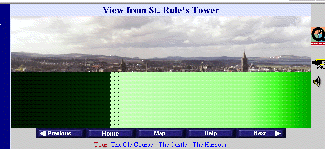
      in with varying amounts of green dots ... what's up ?</FONT></TD> 
    <TD WIDTH="377">
      <P><FONT FACE="Arial">If the picture looks something like the
      picture below, it means the VR scene was interrupted during download.
      This is a known problem (it should refresh but doesn't)</FONT></P>

      <P><IMG SRC="Images/scrnbit.gif" WIDTH="325" HEIGHT="149" ALIGN="BOTTOM"
      BORDER="0" NATURALSIZEFLAG="3"></P>

      <P><FONT FACE="Arial">Click on the &quot;</FONT><I><FONT COLOR="#990000"
       FACE="Arial">Change Size</FONT></I><FONT FACE="Arial">&quot;
      button under the scene to load a smaller, faster version.</FONT>
    </TD>
  </TR>
  <TR>
    <TD VALIGN="TOP" WIDTH="180"><A NAME="aol"></A><FONT FACE="Arial">Why,
      when I use AOL, are some of the pictures (especially the maps)
      blurry and indistinct ?</FONT></TD> 
    <TD WIDTH="377">
      <P><FONT FACE="Arial">This is caused by AOL's image compression.
      It's supposed to speed things up but the images at this site
      are already optimized for speed and further compression just
      makes them fuzzy.</FONT></P>

      <P><FONT FACE="Arial">To turn off AOL's compression ...<BR>
      Choose the &quot;</FONT><I><FONT COLOR="#990000" FACE="Arial">Members</FONT></I><FONT
       FACE="Arial">&quot; or &quot;</FONT><I><FONT COLOR="#990000"
       FACE="Arial">My AOL</FONT></I><FONT FACE="Arial">&quot; button.
      Select &quot;</FONT><I><FONT COLOR="#990000" FACE="Arial">preferences</FONT></I><FONT
       FACE="Arial">&quot;, the &quot;</FONT><I><FONT COLOR="#990000"
       FACE="Arial">WWW</FONT></I><FONT FACE="Arial">&quot; icon, the
      &quot;</FONT><I><FONT COLOR="#990000" FACE="Arial">web graphics</FONT></I><FONT
       FACE="Arial">&quot; tab and <B><U>un</U></B>check the compression
      box.</FONT>
    </TD>
  </TR>
  <TR>
    <TD WIDTH="180" VALIGN="TOP"><A NAME="locate"></A><FONT FACE="Arial">When
      I click on a map button to see where something is I see an arrow,
      but no map ... why ?</FONT></TD> 
    <TD WIDTH="377"><FONT FACE="Arial">The location maps work slightly
      differently from the virtual tour map. The location map is a
      background image with the arrow super-imposed. If you wait (patiently)
      the map will appear, and from then on the location map should
      be very quick.</FONT></TD> 
  </TR>
  <TR>
    <TD VALIGN="TOP" WIDTH="180"><FONT FACE="Arial">Sometimes the
      arrow pointing to places on the town map points at the left hand
      margin in the sea ?</FONT></TD> 
    <TD WIDTH="377"><FONT FACE="Arial">This is due to the browser
      not being wide enough. Maximize the browser or at least enlarge
      it until the arrow jumps right to the correct location on the
      map. Remember this guide is best viewed with a browser maximized
      on an 800x600 screen.</FONT></TD> 
  </TR>
  <TR>
    <TD WIDTH="180"><FONT FACE="Arial">How can I get my Web Page
      listed with the St. Andrews Multimedia Guide ?</FONT></TD> 
    <TD WIDTH="377" VALIGN="TOP"><FONT FACE="Arial">It's quite simple
      really. Just read the instructions and fill out the form you
      will find by <A HREF="register.htm">clicking here</A>. You will
      need to have a postal address within 12 miles of St. Andrews.</FONT></TD> 
  </TR>
  <TR>
    <TD WIDTH="180">&nbsp;</TD>
    <TD WIDTH="377">&nbsp;</TD>
  </TR>
  <TR>
    <TD WIDTH="180" VALIGN="TOP"><A NAME="fax"></A><FONT FACE="Arial">What
      is the e-mail to Fax service ?</FONT></TD> 
    <TD WIDTH="377"><FONT FACE="Arial">Normally, Internet visitors
      will contact a page owner by e-mail.<BR>
      If the page owner does not have, or does not regularly check
      e-mail, the page owner may specify a fax number for enquiries.
      E-mail sent by the visitor is automatically converted to a fax
      which is sent to the page owner. <U>The sender of the e-mail
      should be sure to specify a phone number or address at which
      he/she can be reached with a response.</U></FONT></TD> 
  </TR>
  <TR>
    <TD WIDTH="180"><FONT FACE="Arial">How much does the e-mail to
      fax service cost ?</FONT></TD> 
    <TD WIDTH="377"><FONT FACE="Arial">Nothing. It is Free.<BR>
      The service is paid for by a small amount of advertising which
      is added to the fax.</FONT></TD> 
  </TR>
  <TR>
    <TD WIDTH="180"><FONT FACE="Arial">Why do you use a form for
      e-mail and not a </FONT><U><FONT COLOR="#0000ff" FACE="Arial">mailto:</FONT></U><FONT
       FACE="Arial"> tag which would be easier to reply to.</FONT></TD> 
    <TD WIDTH="377"><FONT FACE="Arial">It's quite simple really,
      this way your e-mail address doesn't appear on our pages and
      is unlikely to be picked up, for junk mail purposes, by robots
      compiling e-mail address lists. In Internet parlance &quot;it
      reduces SPAM&quot;.</FONT></TD> 

  </TR>
  <TR>
    <TD WIDTH="180">&nbsp;</TD>
    <TD WIDTH="377">&nbsp;</TD>
  </TR>
  <TR>
    <TD WIDTH="180" VALIGN="TOP"><FONT FACE="Arial">How do I check
      on the status of a book order ?</FONT></TD> 
    <TD WIDTH="377">
      <P><FONT FACE="Arial">If you ordered in the <A HREF="http://www.amazon.co.uk/">UK,
      use the help button in the top or bottom navigation bars of this
      page</A>.</FONT></P>

      <P><FONT FACE="Arial">If you ordered in the <A HREF="http://www.amazon.com/exec/obidos/subst/help/desk.html">USA
      click here</A>.</FONT>
    </TD>
  </TR>
  <TR>
    <TD WIDTH="180">&nbsp;</TD>
    <TD WIDTH="377">&nbsp;</TD>
  </TR>
  <TR>
    <TD WIDTH="180">&nbsp;</TD>
    <TD WIDTH="377">&nbsp;</TD>
  </TR>
  <TR>
    <TD WIDTH="180"><FONT FACE="Arial">My question wasn't answered
      above what now ?</FONT></TD> 
    <TD WIDTH="377"><FONT FACE="Arial"><A HREF="contact.htm">Contact
      Us</A> We'll do our best to help, and if the question is of broad
      interest, will add it to this page.</FONT></TD> 
  </TR>
</TABLE></CENTER></P>

<FONT FACE="Arial"><CENTER>

<CENTER><A HREF="/cgi/ard.pl?/qz/quiz.htm"><IMG SRC="/sta/ads/quizus.gif" WIDTH=468 HEIGHT=60 ALT="Test your knowledge of St. Andrews"></A></CENTER>
</CENTER> 
<P><CENTER><A HREF="http://www.saint-andrews.co.uk/" TARGET="_top"><FONT SIZE="-2" FACE="Arial"><IMG SRC="/sta/btnhom.jpg" WIDTH="100"HEIGHT="20" ALIGN="BOTTOM" BORDER="0" NATURALSIZEFLAG="3"></FONT></A></CENTER></P>
<P><CENTER><A HREF="/copyright.htm"><FONT SIZE="-2" FACE="Arial">Copyright</FONT></A><FONT SIZE="-2" FACE="Arial"> 
© 1999-2013 <A HREF="http://www.standrewsmedia.com/">St Andrews Media</A> All Rights Reserved.</FONT></CENTER></P>
</TD></TR></TABLE>

<script type="text/javascript">
var gaJsHost = (("https:" == document.location.protocol) ? "https://ssl." : "http://www.");
document.write(unescape("%3Cscript src='" + gaJsHost + "google-analytics.com/ga.js' type='text/javascript'%3E%3C/script%3E"));
</script>
<script type="text/javascript">
try {
var pageTracker = _gat._getTracker("UA-9886177-2");
pageTracker._trackPageview();
} catch(err) {}</script></FONT>

</BODY>
</HTML>